
AI training video production can do more than put a presenter in front of a background. A lesson can show a procedure, follow a decision or take viewers inside a process that would be difficult to film. The useful starting point is what your audience needs to see and understand.
For learning and development teams, customer education teams and course creators commissioning video lessons, three visual approaches are worth considering: realistic AI presenters, AI-generated 3D animation, and motion graphics and animation. They can work separately or together across a training series.
Here is how to choose between them, with examples from our work and the production questions to settle before commissioning a course or training video.
Start with the lesson, then choose the style
Write down what the viewer should be able to understand or do after watching. Follow a product workflow? Recognize a situation? Make a decision? Explain a technical concept to a customer?
Then identify what needs to be shown. A procedure may need a close-up of an action. A technical topic may need a diagram or an internal view. A conversation may be clearer as a scene with characters. Some lessons need a clear presenter and a few supporting graphics.
That gives you a useful production brief. It also helps decide which parts need precise references, an approved sequence or input from your subject experts.
Three visual approaches for AI training videos
1. Realistic AI presenters
An AI presenter can guide a lesson in a simple setting, a branded studio or locations connected to the subject. Realistic camera movement, graphics and effects can make the presentation feel more like a directed film. The level of production should serve the lesson.
Our Newsroom format shows a branded studio, realistic presenters and different camera views. For a training series, this approach could provide a consistent setting for introductions, explanations and recurring sections.
Branded studio and realistic AI presenters
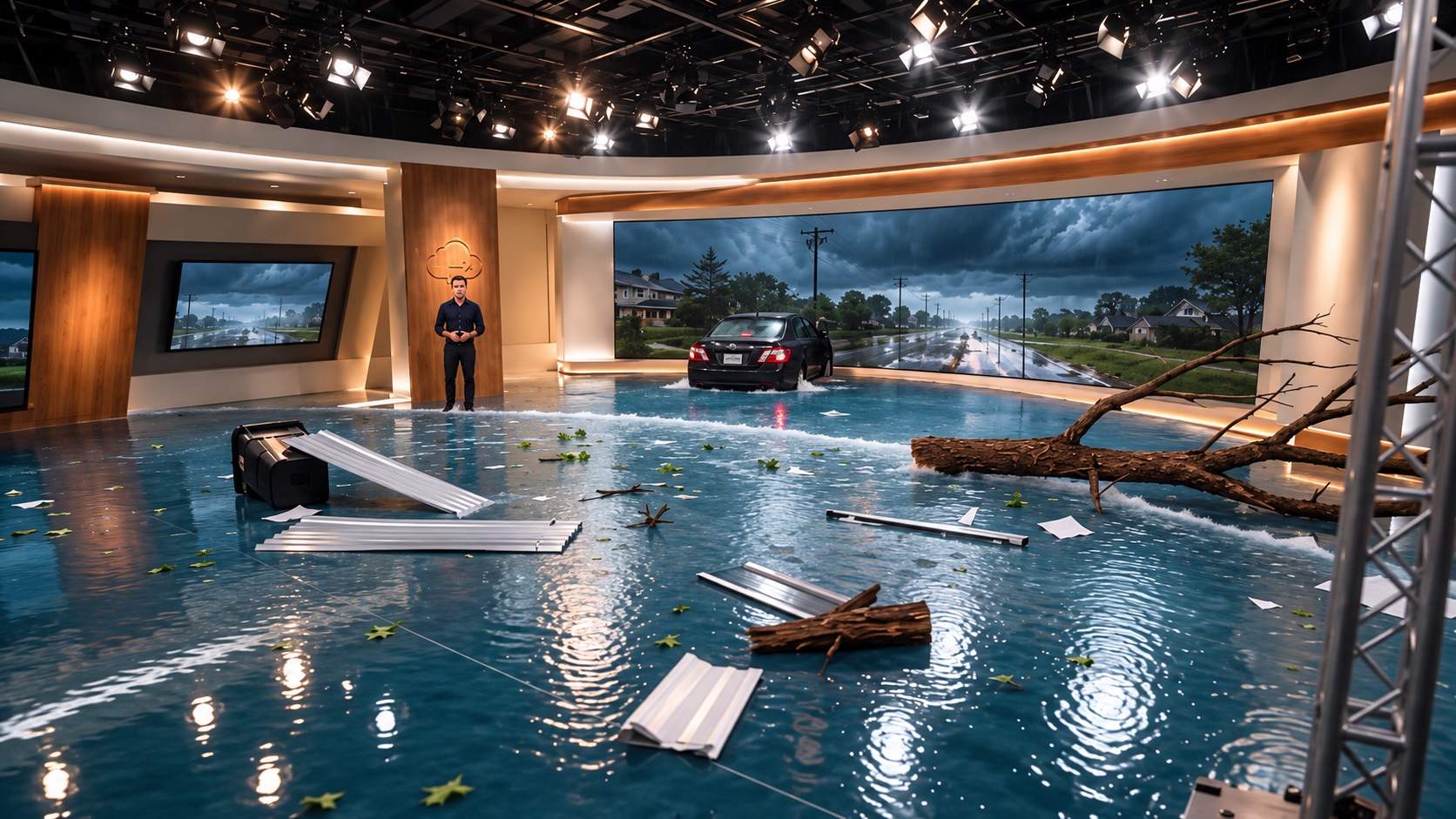
Hurricane takes the same presenter approach further. An AI presenter begins explaining a storm in a simulated TV studio; then wind, water and debris enter the room around him. The explanation becomes part of the scene.
Hurricane — our AI presenter demonstration
Hurricane is our own AI training demonstration. A commissioned lesson can be much quieter: a calm health-related presentation, a presenter moving between relevant locations, or a scene supported by diagrams. These are variations of the same visual family. The subject determines how much camera movement, animation or visual effects to use.
Choose this approach when a presenter helps guide the audience through the material. Decide what needs to happen alongside the presenter, rather than asking them to read every detail aloud.
2. AI-generated 3D animation
AI-generated 3D animation can show actions, environments and processes in a style built around your audience. It can be minimal and restrained, more cartoon-like, or combine stylized characters with realistic locations.
Our Australian care-training example uses animated characters to show part of preparing a sling for an assisted transfer. The excerpt focuses on a specific action within a procedure—a useful distinction when planning a longer lesson or series.
Care-training excerpt — AI-generated 3D animation
Our work for Peninsula Community Legal Centre uses AI-generated characters in realistic public-transport settings for youth education. A situation and a conversation give the audience something concrete to follow. That approach can also be considered for training built around decisions and interactions.
Youth education — animated characters in realistic locations
A different treatment can remove much of the character detail and concentrate attention on a process. This minimal 3D sequence moves between a cabin, an engine and an internal view. The same visual approach can help explain a system in a technical lesson.
Minimal 3D animation — showing a process from different viewpoints
These examples belong to one 3D family, with different visual treatments. For a procedure, plan the actions and viewpoints around the approved instruction. Your subject experts need to review what the animation shows as well as what the narrator says.
3. Motion graphics and animation
Animated type, numbers, diagrams and objects can break an explanation into clear stages. They can form the whole lesson or support a presenter or 3D scene. AI-generated imagery and traditional animation can also be combined where each helps the explanation.
Our medical animation for Forty Seven introduces its work on 5F9 monotherapy. Gilead later acquired the company. For training and course lessons, this kind of animation can make a scientific process visible, with the client’s subject experts reviewing the explanation and visuals.
Medical animation — Forty Seven
This example uses animated text, changing numbers and 3D objects to carry the story. For a training lesson, those techniques could show the stages of a workflow, compare options or explain how parts of a system relate to each other.
AI animation example — motion graphics and 3D visuals
Choose this approach when the audience needs to follow an explanation through changes, connections or comparisons. Work from the approved material and decide which information should be spoken, which should be written, and which can be shown through movement.
Can these become video lessons for a course?
Yes. The same approaches can be produced as individual lessons for employee training, customer education or an online course. A course does not need one visual treatment for every topic: a presenter can introduce a module, animation can explain a process, and a scenario can show how it applies.
For a series, agree what stays consistent: the presenter, terminology, visual style, lesson structure and level of detail. Identify which sections are likely to change so the production and update process can account for them.
Your learning team and subject experts define and approve the content and learning objectives. The production team turns that material into finished video lessons. If you also need assessments, interactive exercises or learning-platform packaging, include those requirements in the brief and agree who will provide them.
When should you commission a production team?
An avatar platform may fit when your team can prepare the script, build the visuals and manage reviews and updates. A production team becomes useful when you need help shaping the explanation, creating a particular visual treatment or delivering a coordinated series.
Both routes can use AI tools. Compare the work your own team would still need to handle: writing, planning scenes, checking details, managing approvals, editing and preparing the final versions. For custom corporate training video production, agree who owns each part before work starts.
What needs to be approved before release?
For healthcare, pharma, finance, safety and other specialist topics, involve your subject experts in the script, planned visuals and finished-video review. A convincing generated scene still needs to show the correct sequence and details.
Identify anything that must remain exact, such as a product interface, a sequence of actions, terminology or approved wording. Agree how those details will be checked. For a real software workflow, accurate screen recordings may be a better choice than generated interface details.
If the video uses someone's likeness or voice, agree permission and permitted uses. For language versions, include language and subject review in the scope. Captions, transcripts, delivery channels and future updates should also be agreed before production.
Brief one representative lesson first
For a series, choose one lesson that represents the production challenge. Use it to settle the presenter or animation style, the level of detail and the review process before extending the approach.
Give the production team:
- The audience and what they need to understand or do.
- Approved source material and the person responsible for checking it.
- The parts that need to be shown, rather than simply read aloud.
- The expected modules, language versions, delivery channels and deadline.
- What is likely to change and who will maintain it.
Review the first lesson against that brief. Your learning team can then decide how to evaluate it with the intended audience before producing the rest of the series.
Discuss your training video or course lessons
Future Video Media creates training videos with AI presenters, animation and visual scenarios, working from approved material with your team reviewing the content. We can develop a visual approach for one lesson or a consistent series.
Tell us about your training project: the audience, the topic, what needs to be shown and whether you are planning a single video or a course of lessons. We can discuss the production approach and the work involved.